

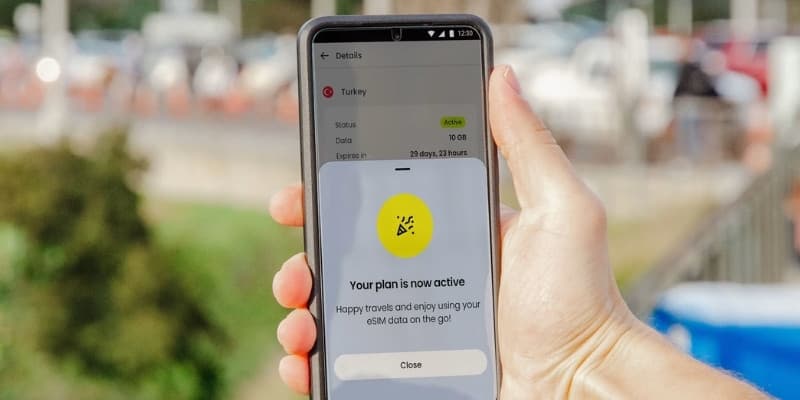
An eSIM ("embedded SIM") is a SIM card built into your phone as software instead of a removable plastic chip. There is nothing to post and no tray to prise open. You buy a data plan online, scan a QR code, and a new mobile line is installed on your phone in under a minute.
For travel, an eSIM does one job well: it lets you buy a cheap local data plan for your destination before you leave home, then connect the moment you land, without paying your home carrier's roaming rates.
How a travel eSIM works
- Compare plans for your destination and buy one from the provider.
- You receive a QR code by email, usually within minutes.
- Open your phone's settings, scan the code, and the eSIM installs.
- When you arrive, the eSIM connects to a local network and you're online.
Your physical SIM stays in the phone the whole time. It keeps your usual number live for calls and texts, while the eSIM handles data. Apps like WhatsApp, iMessage and Signal work as normal because they run over data, not your number.
Most modern phones hold several eSIM profiles at once and let you keep your physical SIM active too. So your home number can stay switched on for calls while a travel eSIM carries your data. You choose which line handles what in settings.
What an eSIM is good for
The clearest win is international travel. A travel eSIM connects you through local networks at local-style data prices, which is the thing that makes it cheaper than switching on roaming with your home carrier. You set it up in advance and arrive online.
Beyond travel, eSIMs make it easy to run two numbers on one phone, a personal and a work line for example, without carrying two devices. They also speed up switching carriers at home, since activating a new plan is a download rather than a wait for a card in the post. And because there is no slot to corrode, the embedded design is one less point of failure.
Will my phone support an eSIM?
Most phones released from around 2019 onwards are eSIM-capable. That includes iPhone XS and later, Google Pixel 3 and later, Samsung Galaxy S20 and later, and most recent Android flagships. The quickest check is Settings → Mobile Data → Add eSIM on iPhone, or Settings → Connections → SIM Manager on Android. If you see an option to add an eSIM, you're good to go.
👉 See if your phone is compatible with our eSIM compatibility checker
How much does a travel eSIM cost?
Price on its own tells you little, because a 1GB plan and a 50GB plan will always look different. The fair measure is price per GB, the cost brought down to a like-for-like amount of data, and it is how we rank every plan we track.
The rates are lower than most people expect. In Singapore, plans start at $4 for 1GB, and a 50GB bundle brings the rate down to $0.96 per GB. The United Arab Emirates looks similar, starting at $4 with the best value landing at $1.56 per GB on a 50GB plan. Canada runs a little higher, from $5.29 for 1GB, with 20GB working out at $2.20 per GB.
Two patterns hold almost everywhere. A larger bundle is nearly always cheaper per gigabyte than a small top-up, so it pays to size your plan to the whole trip rather than buying twice. And the heavier your data use, the wider the gap grows between a local travel eSIM and switching on roaming with your home carrier.
Figures correct as of 20 July 2026. Prices update daily, so check the destination page for the current rate.
👉 Get more savings by checking out our eSIM discount codes
Why travellers switch to eSIMs
- Cost: a local data plan is typically a fraction of carrier roaming.
- Speed: no airport queue for a local SIM, you're connected on arrival.
- Convenience: install before you fly and keep your home number active.
- Flexibility: run multiple plans and switch between them in settings.
How much data should you buy?
That depends on how you use your phone and for how long. Some activities barely touch your allowance while others burn through it. As a rough guide:
- Messaging and chat apps: a few MB a day.
- Map navigation: around 5 MB per hour of active use.
- Music streaming: roughly 60 to 150 MB an hour, depending on quality.
- Video streaming: 700 MB to 2 GB an hour, depending on resolution.
- Video calls: around 200 to 400 MB an hour.
As a frame, a week of ordinary use with navigation, social apps and some browsing tends to fit comfortably in a few GB, while anyone streaming video daily should budget more. If you run low, most plans let you top up rather than buy again from scratch. See how to top up an eSIM.
eSIM beyond travel
The embedded design does more than save you on roaming. Because the SIM is a chip smaller than the tray it replaces, manufacturers reclaim space inside the phone for a larger battery and can seal the device better against water. The same technology powers smartwatches and other wearables that are too small for a physical SIM at all. It also runs at scale in connected devices, where a fleet of thousands of units can be moved to a new network by a remote profile update rather than a physical swap. There is an environmental angle too, since removing billions of plastic cards from annual production cuts a large stream of waste.
Moving an eSIM to a new phone
An eSIM is tied to a profile rather than a card you can pop out, so moving to a new phone works differently. On recent iPhones and Android devices, a built-in transfer tool can move an active eSIM across during setup. For a travel eSIM specifically, the simpler route is often to reinstall the provider's profile on the new phone if the plan is still within its validity window, or to contact the provider for a fresh QR code. Delete the old profile from the previous phone once the transfer is confirmed so you are not carrying a dead line. Full steps are in how to transfer an eSIM.
Do travel eSIMs need registration?
For a data-only travel eSIM, almost never. These plans connect you through roaming agreements rather than signing you up as a local subscriber, so the government ID rules that apply to local prepaid SIMs do not reach them in the destinations we cover. The one provider-level exception is Airalo in the United Arab Emirates, which runs a short electronic verification. The full picture is in do eSIMs need registration.
Calls, texts, and your phone number
Most travel eSIMs are sold for data. That is enough to run WhatsApp, iMessage, Signal, FaceTime, maps and email over the internet, which covers how most people stay in touch abroad. Plans that include a local number for traditional calls and texts exist but are less common.
Installing a travel eSIM does not change your existing phone number. Your home number stays attached to your home line. If you keep that line switched on alongside the eSIM, you can still receive calls and texts on it, though doing so may incur your carrier's roaming charges, so many travellers leave the home line on for messages but route data through the eSIM. Apps like WhatsApp stay tied to your original number regardless of which line carries the data.
Frequently asked questions
Do I need to remove my normal SIM to use an eSIM?
No. Your physical SIM stays in and keeps your number active for calls and texts. The eSIM runs alongside it and handles data. Just turn off roaming on your physical SIM so it doesn't charge you.
Can I keep my phone number while using a travel eSIM?
Yes. Your number lives on your physical SIM, which stays active. The travel eSIM only provides data, so your number is unaffected.
Is an eSIM better than a physical SIM for travel?
For most travellers, an eSIM is more convenient because you buy and install it before you leave and avoid roaming rates. A physical SIM still wins if your phone has no eSIM support or you move a single SIM between several devices. The trade-offs are covered in eSIM vs physical SIM.
Does installing an eSIM cost anything beyond the plan?
No. You pay for the data plan. Adding the eSIM profile to your phone is free, and most phones support it out of the box.
Will my eSIM work as soon as I install it?
It depends on the plan. Some activate the moment you install them, others on first connection in the destination. Check the activation type before you travel so your validity window does not start early. See how to activate an eSIM.
Does an eSIM drain the battery or weaken signal?
No. An eSIM uses the same radio hardware as a physical SIM, so it makes no difference to battery life or signal strength on its own. Your reception depends on the network you connect to, not on whether the SIM is embedded or removable.
Is an eSIM secure?
Yes. An eSIM is at least as secure as a physical SIM and harder to steal, since there is no card to remove from a lost phone. Profiles are provisioned cryptographically, and a data-only travel eSIM holds little personal information in any case.